To create and manage any website a website requires two important components i.e. Web Hosting and Domain Name. Web Hosting is a place where you store various data, files, codes, and information. Domain Name is the address of a website that makes it easy to remember the name in case of complex numeric IP address. In this article, we will explore what domain names are and what different types of domain names are. Also, we will explore the difference between domain name and URL and How to secure your domain name.
Table of Contents
ToggleWhat is Domain Name ?
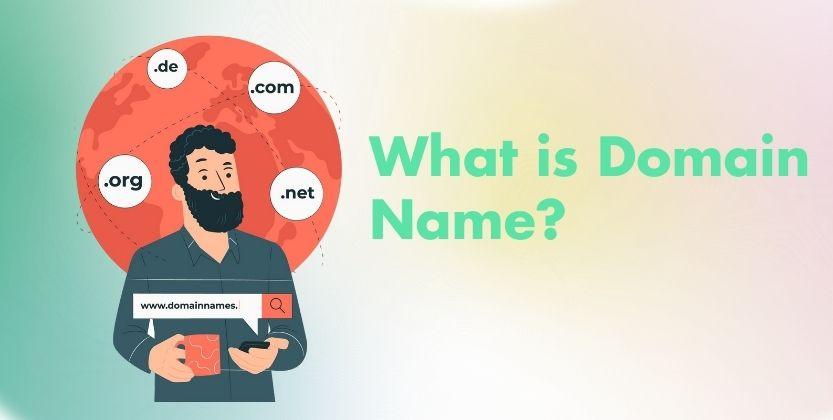
Domain is a unique web address that makes users easy to remember when accessing their website. In other words, it is an alphanumeric IP address used to access a website when typed into a browser to reach a particular website.
For example, the domain name for YouTube is Youtube.com, and the domain name for Facebook is Facebook.com.
The domain name of a website is a complex numeric IP address such as 153.251 or 208.65.153.253. Which is difficult to remember and need to write down all of these IP addresses when want to access their site. Due to the DNS system, users can enter human-friendly domain names and visit these websites as easily as they are willing to.
Difference between Domain name and URL
URL stands for Uniform Resource Locator, often known as a web address. Domain name and URL look the same for the user but have some differences. Domain name is the web address of the website just like the name of the person. Whereas, a URL is a type of web address that contains other information including the domain name. For example https://Youtube.com/feed/library. Here https:// is the protocol, Feed/Library is the path of a specific website page, and Youtube.com is the website’s domain name.
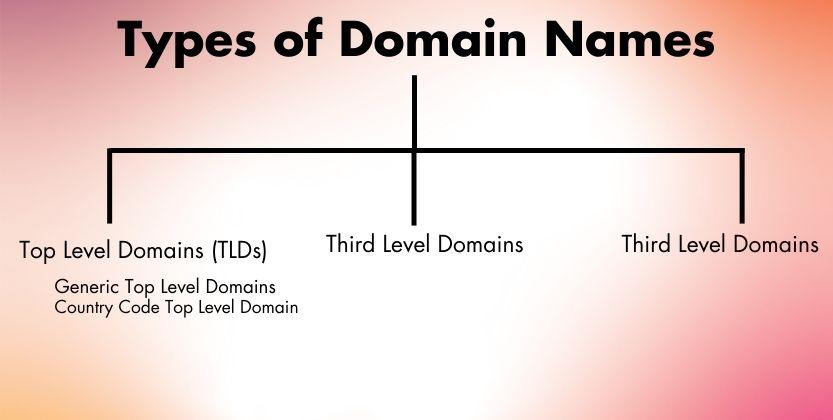
Types of Domain Name
Top Level Domain Names (TLDs)
TLDs are the popular types of domain names used widely by an individual and businesses all around the world. One of the popular known Top Level Domains is .com which is an extension used after the main domain name. It is derived from the word “Commercial” used basically for commercial purposes. Many small and large businesses create websites using .com as their domain extension. The other top-level domain extensions are .net, .gov, .org, and many more.
We have categorized Top Level Domains Extensions into two levels i.e. Generic Top-Level Domains (gTLDs) and Country Code Top Level Domains (ccTLDs).
Generic Top Level Domains (gTLD)
These types of domain names are simply known as Top Level Domains as they do not depend on Country code and are widely accepted all over the world. However, these domain name extensions represent the specific community or specific business. Therefore, you sometimes need to be careful on selecting these domain names. .com is a universal domain name and can be used for any type of business you are operating.
- .com, .net, .gov, .org, and many others are Generic Top-Level Domain names defining the domain class. Here are some examples of these Generic Top Level Domains and their users.
.com: .com is a popular domain name extension available for commercial use. These types of extensions can be used for any type of website and blog for individuals, businesses, or organizations. - .net: .net is commonly used for those companies related to software development frameworks such as application developers for mobile and computer, web designers and technology-related businesses.
- .org: .org is commonly used for business organizations or service-oriented companies. In short, the domain extension is used by non-profit organizations such as charity companies, cultural and religious sites, artistic and science or even sometimes educational institutions.
- .edu: .edu is for educational institutions. Any business related to educational institutions and educational organizations. The domain was implemented in 1985 to focus your domain targeting for educational purposes.
- .gov: .gov is another useful domain extension to ensure the website is a trusted government-related content provider site. Only government organizations are allowed to register these types of domain extensions.
Country Code Top Level Domains (ccTLDs)
As its name suggests, these domain name extensions represent the particular country code geographical location or territory. They are generally two-letter domain extensions used to represent the country.
For more clarification, the website from the USA may use .us as their domain extension to represent their company located in the USA. Similarly, a website for Japan uses .jp, and .uk for the United Kingdom.
Some other examples of ccTLDs are
- .it for Italy
- .de for Germany
- .cn for China
- .kr for Korea
- And many more
Some Company uses ccTLD domain names to represent the business operated for a specific country and differentiate localized content across different regions.
For example, Haier Company uses Haier.com as their main website but also has its own regional websites such as Haier.co.jp for Japan.
Second Level Domain (SLD)
The second Level Domain (SLD) is located before any domain extensions of the website. For more clarity, it is a domain name you choose for your website. Sometimes we can say it is the name of your website. For example, www.facebook.com, the word “Facebook” is the Second Level Domain of the website.
In some cases, Companies use Second Level Domain to indicate the specific entity. For example, the academic institutions in the United Kingdom use the common domain as the .ac.uk domain name.
Third Level Domain Name
Third-level domain Names are often known as subdomains of the website. These types of domain names are used before Second Level Domains (SLD). The domain is used to separate from the parent domain name in the same server so you do not have to register another domain and use can create a sub-domain of your main domain.
For example, YouTube.com is the main domain of your website, YouTube may use another subdomain as tv.Youtube.com. For Live Television is a third-level domain name and provides 70+ networks including live sports and news from your local channels through the given site.
The Third level domain is also a hostname. For example, www which means the World Wide Web is a third-level domain when we access any website and can have an additional subdomain beside the host name.
New General Top-Level Domains (nTLDs)
ICANN approved the New General Top Level Domain Name in October 2013 with more than 1,300 nTLDs with the needs and requests of individuals and businesses. New General Top-Level Domains (nTLDs) are a creative way for businesses to express their business identity with the perfect business expressing their business identity and stand out among the countless number of sites around today. Some of the popular available nTLDs domains are .coffee, .yoga, .photography, .toys, .pizza, .coffee and so on.
How to Secure your Domain Name?

Securing your domain name is important for every business or individual and protects your online presence and brand identity. Here are 8 steps you can take to ensure the security of your domain name.
Choose a Reliable Registrar
Always choose or buy a domain name from a reputable registrar company to register your domain. Some popular domain registrar company to register domain name includes Bluehost, Godaddy, Namecheap, Google Domains, and many other domain registrar. Research the domain and domain-related features and security maintenance including the company’s review and ratings before you make your choice.
Use Strong Password
When you purchase a domain name and manage your domain registrars, an individual and business should use strong and unique passwords when creating your registrar account. Avoid using easy-to-guess passwords and use a password with a combination of letters, numbers, and special characters.
Enable Two-Factor Authentication (2FA)
Enable Two-Factor Authentication to add extra security to your account. This provides your domain name high level of security maintenance by receiving a one-time code on your phone or through an authenticator app when you log in.
Keep Contact Information Up-to-Date
When you register a domain name and to maintain your domain security, an individual or businesses should ensure the contact information with the registrar is accurate and up-to-date including the email address, phone number, and contact address. This will help you receive important notifications and updates.
Enable WHOIS Privacy
WHOIS Privacy helps your domain name secure hiding the domain owner’s personal contact information from the public WHOIS database. This will help the domain owner to protect your domain identity and reduce spam and phishing attempts.
Check Your Domain Regularly
Regularly check your domain by logging into your domain registrar’s control panel and check the status of your domain. Also, check your domain’s DNS records are correct and that there have been no unauthorized changes.
Backup your Website
Regularly back up your website’s content and data. This is important not only for security but also plays a vital role in preventing your website’s data and information in case of accidental domain loss.
Keep Records
Maintain records of your domain registration, account details and any communication with your registrar. This can be helpful if you need to resolve issues and disputes.
How to Choose the Right Domain Name for Your Blog and Website?
Choosing the right domain name for your blog or website is crucial as it plays a significant role in your brand identity and online presence. Here are some steps to help you select and secure your Domain name.
Identify your Blog's Purpose
Determine the primary focus or niche of your blog. Consider the topics you plan to cover and the target audience you want to attract. This will help you brainstorm domain name ideas that align with your blog’s content.
Keep It Simple and Memorable
Choose a domain name that is easy to remember, pronounce, and spell. Avoid using complex or lengthy words that may confuse or discourage visitors from returning to your site. A concise domain name tends to be more memorable and user-friendly.
Reflect Your Brand
Your domain name should represent your brand or blog effectively. It should reflect your blog’s personality, values, and the image you want to portray. If possible, incorporate keywords related to your niche within the domain name to make it more relevant to search engines and potential visitors.
Consider the Extension
Select the appropriate domain extension that aligns with your blog’s purpose. If your target audience is primarily local, consider using a country-specific extension like .us, .uk, or .ca. For a global audience, popular extensions like .com, .net, or industry-specific extensions like .blog can work well. Choose an extension that resonates with your target audience and helps establish credibility.
Avoid Trademark Infringement
Ensure that the domain name you choose does not infringe upon any existing trademarks or copyrights. Conduct a thorough search to ensure your chosen domain name is unique and not already registered by another entity. This will help you avoid legal issues and potential conflicts down the line.
Check Domain Availability
Once you have a list of potential domain names, use a domain registrar or hosting provider’s search tool to check if they are available. It’s advisable to have a few backup options in case your first choice is already taken.
Research Social Media Availability
Seek Feedback
Get input from friends, family, or fellow bloggers to gather different perspectives and opinions on your shortlisted domain names. They can offer valuable insights and suggestions that you might have missed.
Register Your Domain
Once you have finalized your domain name, proceed to register it with a reliable domain registrar or hosting provider. Ensure you provide accurate and up-to-date contact information during the registration process.
Remember that your domain name is a long-term commitment, so choose wisely. It’s an essential part of your online identity, branding, and search engine optimization (SEO) efforts. Take your time, research thoroughly, and select a domain name that aligns with your blog’s goals and resonates with your target audience.
How to Register Domain Name?
Here are 13 important steps on how to register a domain name. Consider each step wisely.
Choose a Domain Name
Every domain name is an online address of your website. Domain can also be considered as the brand name of your business or an individual. Therefore, it is important to choose the right domain name that fits your business and website’s content or your brand. Also, when choosing a domain name, it should be easy to read, understand, and remember to reflect your site’s purpose and target audience. We have explained above in detail to learn how to choose the right domain name for your business and website. For further understanding, you can read here.
Check Domain Availability
After choosing the right domain name for your website, it is important to ensure that the domain name you are looking for, is needed to check domain availability for registration. You can check domain availability, using various domain registrar search tools. If the domain you are looking for your website is already taken, you may need to brainstorm alternative names for your website.
Choose Domain Extension
When you check a domain name for your website, it is important to select the right domain extension for your website. Among various types of websites, decide to take the right domain extension that suits your business website. Top-Level Domains (TLDs) domain extension can be the first consideration when you purchase a domain name including .com, net, .org, or other TLDs. There is also another domain extension you can take into consideration related to your business, or regions that suit your business purpose.
Add the Domain to your Cart
As you are happy with the domain name and the name you choose satisfy you or your business. You can register a domain name simply by clicking the domain name to add it to your cart. From here you will start registering the domain name process.
Review your Order
efore you complete a domain registration for your website, you need to review the order carefully. Check carefully about all the details you add when you purchase a website including domain name spellings, domain extensions, and other additional services such as domain privacy protection or email hosting. Also, check the domain registration period and the total cost
Complete the Registration
After you choose the right domain name, process the registration, and review all the order processes; you can complete the domain registration. Proceed to the checkout and provide your contact information and payment details. Provide all the details accurately especially contact details as it is essential for managing your domain and receiving renewal notifications.
Set Domain Name Servers
After registering your domain, you will need to specify the domain name server or DNS (Domain Name System) servers to which your domain will point. Through the domain registrar’s control panel, you can easily set the domain name system.
Review and Confirms
Double-check the registration details and confirm the information before you proceed to payment. This step confirms your ownership of your domain name and initiates the registration proces
Domain Ownership Verification
After registration, you may receive an email from the company you register a domain to verify the ownership of your domain for security measures. This step confirms your ownership of the domain and moves further to the domain registration process.
Access your Control Panel
Once the domain is registered, you can proceed further by accessing the domain control panel provided by the domain registrar company. In this domain registrar panel, you can manage various domain settings including DNS records and domains looking for security.
Set Up Your Website
With the domain you registered, you can proceed to create and host your website. This involves designing your site, adding content, and using web hosting services to make your website accessible on the internet.
Renew your Domain
Keep track of your domain’s expiration date and renew the domain before it expires to maintain ownership. Most registrars offer options for auto-renewal to prevent accidental domain loss. If your domain register does not provide auto-renewal, it is important to track the date for expiration.
How to Transfer Domain Name?
With several steps, you can easily able to transfer a domain name from one registrar to another registrar. First, you need to ensure your domain name is eligible to transfer by meeting certain criteria it should be at least 60 days old and not in a redemption or deletion period. Choose the new domain registrar company create an account with them and process the transfer of the domain name proving the domain name and paying the domain transfer fee. You need to wait for domain transfer approval from the domain Registrar Company. As you are approved by the domain registrar company, you can able to transfer the domain within a few days.
How to Check the Owner of Domain Name?
To check the owner of the domain name of any website, you can easily check through WHOIS Lookup. WHOIS is a protocol and a database used to retrieve information about the domain and other related information about the domain including the domain’s owner and their contact details. Some of the popular available WHOIS Lookup tools are ICANN WHOIS, Domain Tools and WHOIS.net. These services provide a simple interface to receive information on domain ownership and details. You can use one of these available tools and enter the domain name on the search bar that you want to look for click on the search or lookup button and view the result available for you.
You need to remember that not all domain owners will have their information publicly available in the WHOIS database. Some domain owner might be using privacy protection services to keep their all information hidden. In such a case, you might not provide results.
How can I get a Free Domain Name?
Are you looking for free domain name for your website? Various platforms provide free domain names for your website. Some website hosting company provides free domain name if you are purchasing their web hosting services. If you love their web hosting services, then you can get their web hosting service and host your website with their free domain registration service. Some popular company that provides free domain registration service when you purchase web hosting services are Bluehost, Hostinger, Hostgator And so on.
If you are looking for other platforms to get a free domain name then Freenom.com can be one of the best choices. The platform provides free domain names forever. You do not need to pay any money to get their domain registration services. They also provide premium domain name extensions which you can buy from them as well.
If you are from Nepal or if your business operates in Nepal, you can easily register a free domain name with the .np extension (Country Code Top Level Domains) and use it forever. This service is available only for citizens of Nepal or foreigners who are living in Nepal only. To learn more about .np domain registration we have prepared a seperate article on “How to Register .com.np domain name for free?”
What happens when Your Domain Expires?
Domain needs to be renewed every year. Some domain registrar provides auto-renewal services which you do not have to track their date for expiry. However, the website owner needs to learn what happens when your domain expires if you do not renew the domain name in time. Some specific outcomes may arise depending on the policy domain registrars. Here are some typical actions taken when your domain expires
- Many domain registrar companies provide a grace period ranging from 1 week to 45 days. During this time if you renew the domain name you will not be required to pay incurring additional payment or losing domain ownership.
- If you still do not renew your domain name, the domain name may entered to Redemption Grace Period. This is not immediately available for registration. However, the restoration process usually incurs additional fees which can be significant.
- If the domain is renewed after the grace period, the domain will enter to Pending Delete phase. Here you will receive the 5 days to domain renew.
- After the Pending Delete phase, the domain becomes available for registration by the general public where other individuals or companies can register the domain name on a first come first served. And here you will lose the ownership of your domain name.