Creating a website is one of the most important steps for establishing your business’s online presence. In today’s technological era, having a website has become necessary as it has greatly impacted digital presence and driven positive business outcomes. To achieve your business’s online presence and growth, choosing the right CMS (Content Management System) becomes a major key point. Here comes one of the popular CMS platforms- HubSpot CMS for Website creation. In this article, we will explore the meaning of HubSpot CMS and how to create a Website on HubSpot CMS platform.
HubSpot CMS is a popular CMS platform designed to meet the diverse needs of marketers, developers, and business owners. Also, it can easily integrate with different marketing and sales tools.
HubSpot CMS helps its users to create, manage, publish, and optimize the website easily. In this article, we will explore the understanding the HubSpot, its features, advantages, and limitations, and the process to create a website on the HubSpot CMS platform.
Table of Contents
ToggleWhat is HubSpot CMS?
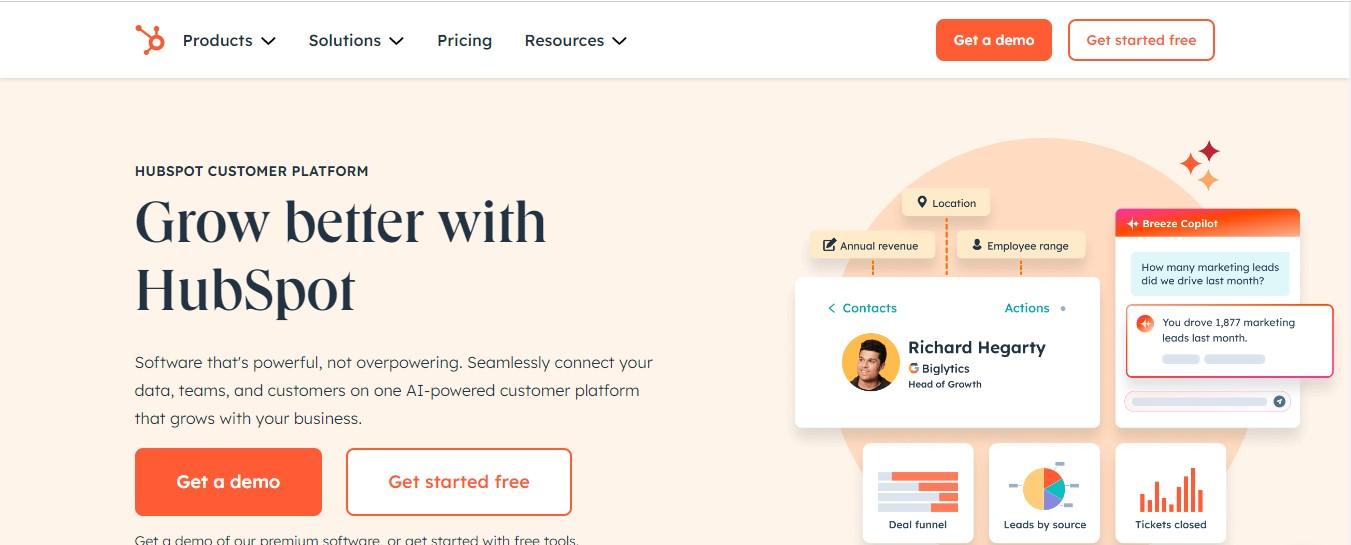
HubSpot CMS (Content Management System) is known as a powerful platform that allows users to create, design, and manage websites effortlessly. It is a part of the broad HubSpot ecosystem that includes marketing, sales, and customer relationship management (CRM) tools. As a HubSpot CMS user, you can easily integrate with their ecosystem which helps to grow your business to generate leads of the business.
To create a website on the HubSpot CMS platform, one should know about their business and their ecosystem. HubSpot CMS platform provides drag-and-drop editor features like other popular website builders- Wix and Squarespace, including customizable themes, built-in SEO tools, and analytics. These tools are widely popular so, anyone can create a website without having extensive technical skills. This makes it suitable for any business size to drive business growth.
Why Choose HubSpot CMS to Create a Website?
Hiring a web developer or following any traditional method of website development can be expensive and time-consuming. To overcome this situation, we have addressed different reasons for choosing HubSpot CMS to create a website, and the reasons are explained in the following points.
Integration with HubSpot Ecosystem
HubSpot CMS is a part of the HubSpot ecosystem. As a HubSpot user, you can easily integrate with the HubSpot ecosystem including HubSpot CRM. This allows business users to manage the website and customer relationships in a platform. For instance, you can easily personalize website content based on your visitor’s interaction history to gain higher engagement and better user experience.
User Friendly Design
Like other popular platforms such as Wix and Squarespace, HubSpot CMS provides features like a drag-and-drop editor to design websites without requiring coding skills. This feature is suitable for businesses that want to quickly create landing pages, blogs, and product pages without depending on developers.
Integration with HubSpot Ecosystem
HubSpot CMS is a part of the HubSpot ecosystem. As a HubSpot user, you can easily integrate with the HubSpot ecosystem including HubSpot CRM. This allows business users to manage the website and customer relationships in a platform. For instance, you can easily personalize website content based on your visitor’s interaction history to gain higher engagement and better user experience.
Built-in SEO and Optimization Tools
As HubSpot users, you can easily integrate with SEO recommendations that help you optimize your website and its contents for search engines. The tool helps you with keyword suggestions to performance analytics, ensuring your website better ranking in search results.
Better Security and Performance
The platform provides built-in SSL, global CDN, and regular updates. This helps your website stay secure and perform better under varying traffic conditions.
Scalability
The platform is suitable for different business sizes. Whether you are a startup or a large enterprise, the platform has greater scalability, allowing you to expand your website as your business grows.
Key Features of HubSpot CMS
HubSpot CMS offers a wide range of features, making the platform the most preferred option to create a website. Check out some of the features you need to consider creating a website on the HubSpot CMS.
Customization Themes and Templates
HubSpot CMS provides a wide collection of pre-designed themes and templates that are fully customizable and can easily align to your website design to represent it based on your business and brand.
Drag-and-Drop Builder
The drag-and-drop builder eliminates the traditional method of creating pages and also does not require coding. The feature is perfect for marketers who want to design websites without coding skills and make real-time updates.
Smart Content and Personalization
With Smart Content, it allows you to create a website based on visitor behavior, location and interaction history. This helps you to enhance user engagement and improves conversion rates.
Analytics and Reporting
HubSpot CMS includes built-in analytics for proper insight or website performance, visitor behavior, and lead generation. This helps your business make a decision based on the data given through various analytical tools.
Multilingual Support
HubSpot supports multiple languages, so you can create a website for a global audience. This is an important feature if you are looking to expand your business international market.
How To Create a Website on the HubSpot CMS?
Creating a Website on HubSpot CMS is an easy and straightforward process. Here are 7 major steps to create a website on HubSpot CMS.
Tips: The process to create a website on HubSpot CMS keeps changing as their tools keeps increasing. Here is the latest i.e. 2025 year’s process to create a website on HubSpot Platform.
Step 1
Sign Up on HubSpot
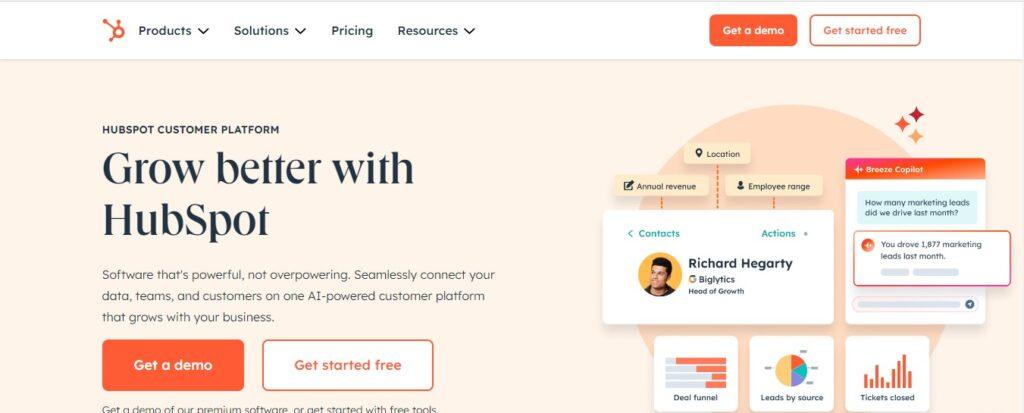
You can start your website creating first by signing up to the HubSpot’s Account. At first you can visit their website URL or can directly click on this URL for easy step for website creation. Link- www.hubspot.com/products/cms as, you click the URL, you need to sign up and create a account for free.
Step 2
Create a Account
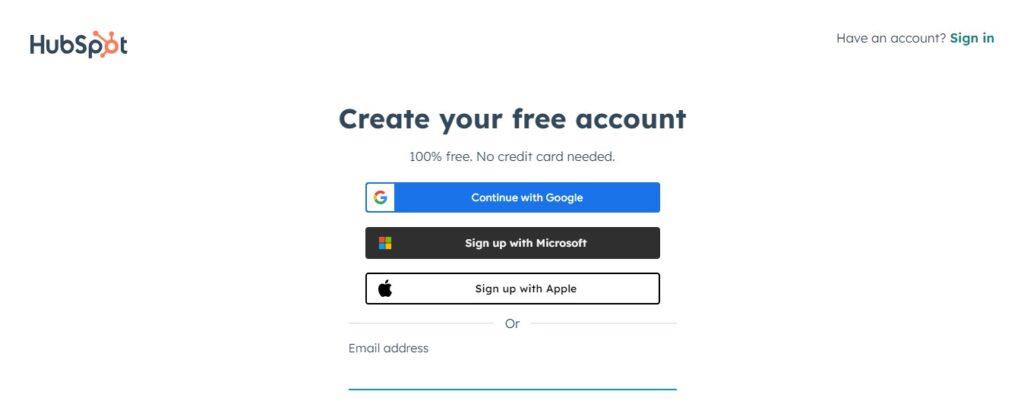
You can easily create an account on HubSpot by three ways i.e. Gmail, Apple, and Microsoft Account. After you create an account, you will receive a Gmail notification for verification, you can verify the account and enter to the Dashboard.
Step 3
Hover Content and Click Website Page
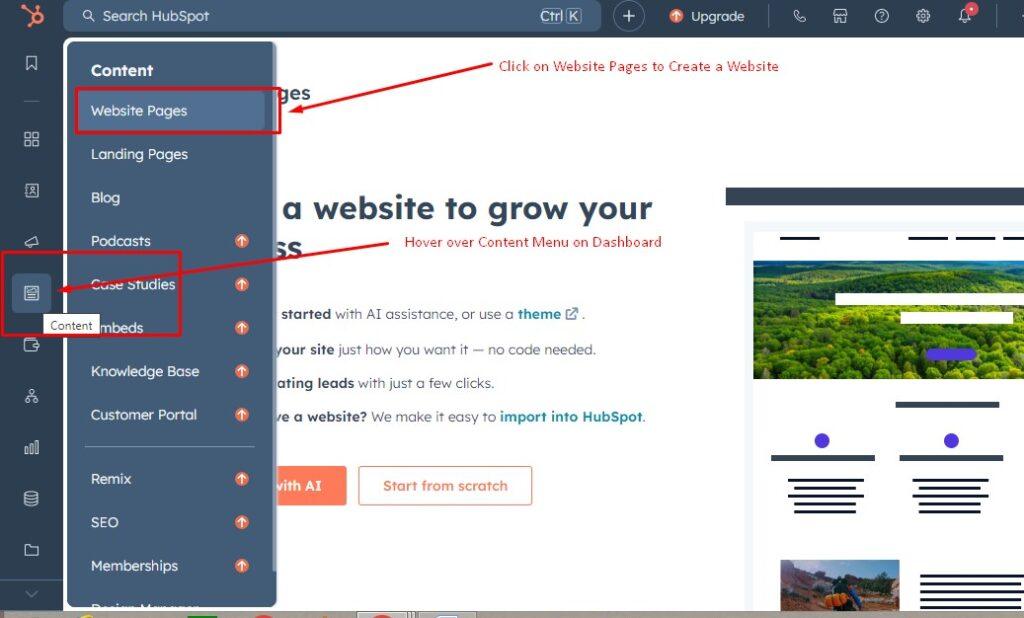
After an Account Verification, You can now Hover over Content and Click on Website pages. Here you can easily create your website. Also, If you want to create a landing page on HubSpot, you can click on Landing page and create your Landing page site.
Step 4
Get Started With your account
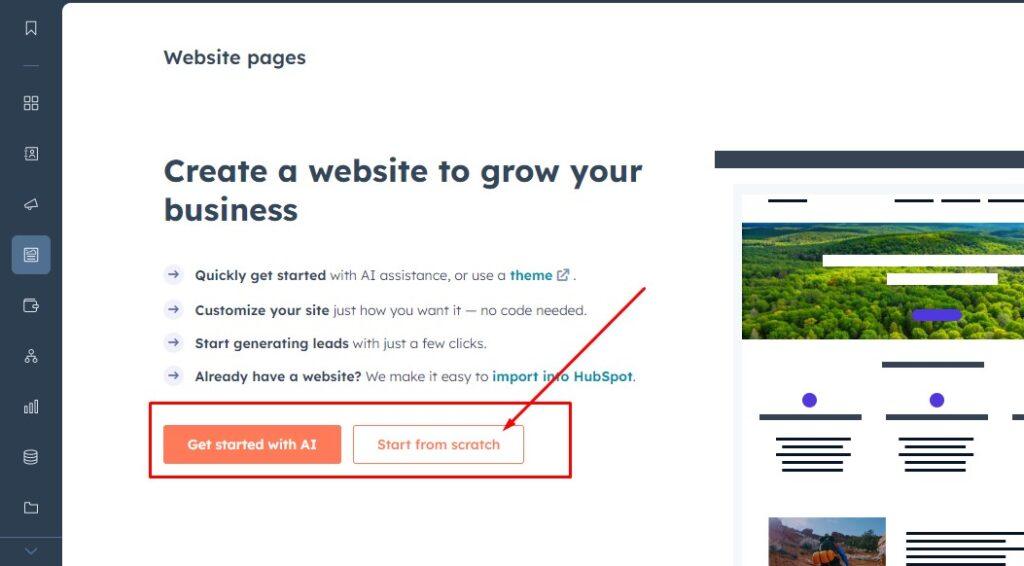
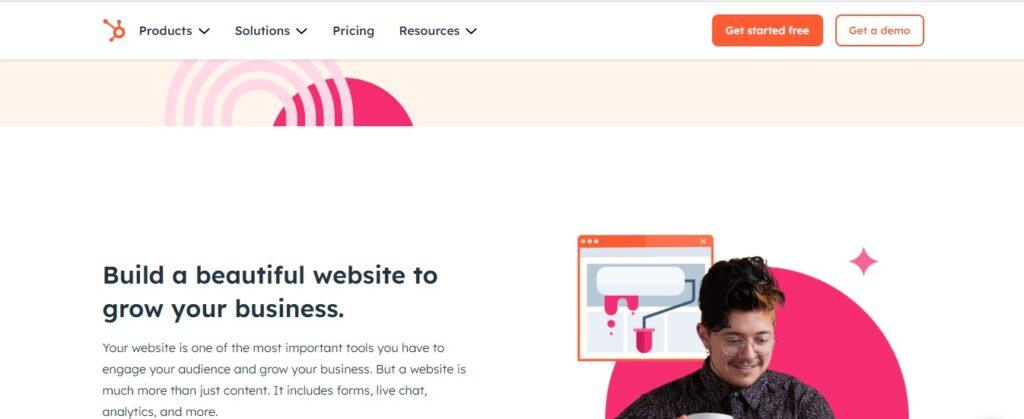
When you click on the Website page, you will move to another page as “Create a website to Grow Your business and provide you major two options i.e. Get Started with AI and Start from Scratch. Choose either of them, I would recommend Start from scratch which helps you create a website manually.
Step 5
Choose a Right Theme
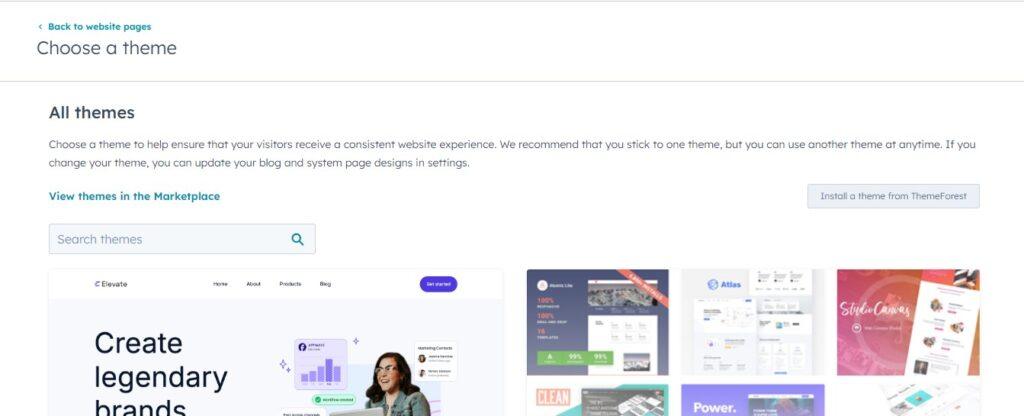
Choose the right theme for your website. Simply browse the theme clicking on view themes in the Marketplace and search the suitable theme for your website.
Step 6
Install a Theme
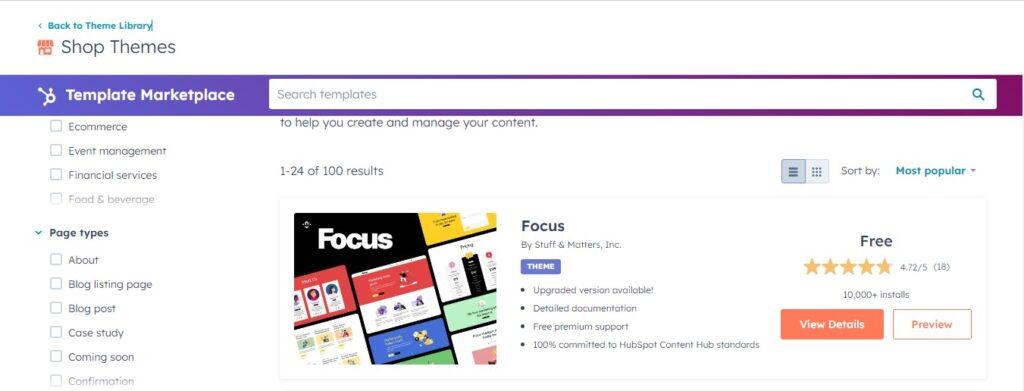
As you browse the different templates, click on the right template for your website and click on install a theme.
Step 7
Edit Theme Setting
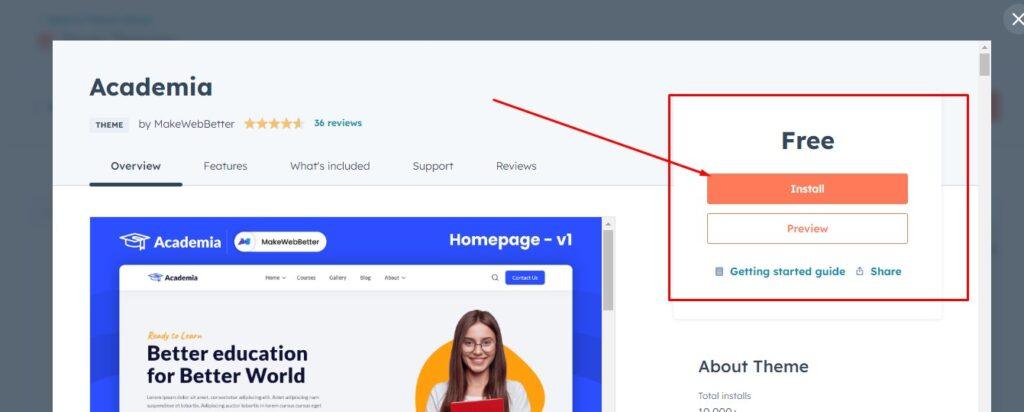
When you install your preferred theme, you need to change the setting of the themes such as fonts, colors, Footer, Menus, Headers, and other necessary element based on your business requirement to represent your brand. After you are fully satisfied with your design, click on save button and can publish the theme.
Advantages of HubSpot
-
All-in-One Platform
HubSpot CMS platform can easily integrate with their ecosystem; such as marketing, sales, and CRM Tools, creating a unique platform required for all businesses for online presence and growth.
-
Easy Maintenance
With their fully automatic features and integration with their larger ecosystem, you can maintain your website easily whether you are a beginner or a professional.
-
Collaboration Tools
Here, the team can easily collaborate effectively with shared access to content and design elements.
-
Scalability
When your business grows, HubSpot CMS grows with it. They offer better options and resources to support your business.
Limitations of HubSpot
HubSpot is a popular CMS platform to create and manage websites. However, it is important to consider its limitations before you choose the HubSpot Platform.
-
Cost
HubSpot CMS consists of a premium plan that can be an expensive option for startups and small businesses with limited budgets.
-
Dependency on the HubSpot Ecosystem
When you use HubSpot CMS, you may heavily rely on HubSpot's ecosystem, which may not suit users looking for more flexibility.
-
Limited Advanced Customization
The platform provides drag-and-drop features, but developers may find it limiting if they seek advanced customization features.
-
HubSpot Logo on Free Account
This can be quite irritating when you have Hubspot logo into your website. This also seems unprofessional which make you upgrade their premium plan.
Who Should Use HubSpot CMS?
HubSpot is best suitable for business such as-
As a Marketer: A market with a limited budget to create, manages, and optimizes a website easily for marketing their business or their client’s business.
Different-Sized Businesses: Different-sized businesses looking for all-in-one solutions for their business growth.
Teams: The tool is a better option requiring integration between two websites, marketing, and sales.
HubSpot Pricing
Choosing the right Content Management System (CMS) for a website- plays a vital role in its online presence for business success. HubSpot CMS is an amazing platform designed to integrate with different HubSpot ecosystems. However, you need to understand the pricing structure that fits your business. Here, we will explore some of the pricing structures with features you need to consider before you invest.
Overview of HubSpot CMS Pricing Plans
Lists of HubSpot Pricing structures offer different levels of features and capabilities.
- Free Tools Plans
- CMS Hub Starter
- CMS Hub Professional
- CMS Hub Enterprise
Free Tools Plan
As a startup and beginner, the Free tools plan is a great starting point for individuals and small businesses. The tools included in the free plan are limited such as.
- Free Website Hosting
- Basic Website Templates
- SSL Certificates for Security
- Integration with HubSpot CRM
However, the plan has some limitations, such as a lack of advanced customization and limitations on scalability for the growth of your website.
Start your Website for Free ($0)
CMS Hub Starter
CMS Hub Starter is designed for Small businesses looking for extra features that need a professional online presence without breaking the bank.
- Custom Domain Connection
- Drag-and-Drop Website editor
- Basic SEO Tools
- Email and in-app Support
- Get CMS Hub Professional – $25/Month
CMS Hub Professionals
The professional plan is the best option for growing businesses looking for a company with advanced tools to manage and optimize their website.
- All Features from Free and Starter Plan
- Advanced SEO Recommendations
- 24/7 Customer Support
- Integration with Custom APIs
- Dynamic Content and Personalization Options
- CMS Hub Professional – $400/Month
CMS Hub Enterprise
The plan is suitable for large-scale organizations with complex requirements. The plan offers higher customization options, security options, and better scalability.
- Custom Web Apps integrations
- Additional team and content management features
- Advanced Security features
- All Features for the Professional Plan
- CMS Hub Professional – $1,200/Month
HubSpot CMS vs. WordPress
Selecting the most appropriate Content Management System (CMS) is one critical decision made towards creating, editing, and managing a website. HubSpot CMS and WordPress are the two popularly used platforms, with their particular advantages, Limitations, and optimal use cases. Check out some differences between HubSpot CMS and WordPress, explain the suitable features of both, and highlight how HubSpot CMS can be the best choice for certain businesses.
HubSpot CMS and WordPress are two excellent platforms for creating and maintaining personal or business websites. Each of these websites is ideal for the respective audience and the goal one might have for the website.
| Feature | HubSpot CMS | WordPress |
|---|---|---|
| Ease of Use | Drag-and-drop interface | Requires technical expertise |
| Customization | Limited but controlled | Highly flexible |
| Integration | Built-in CRM and marketing | Depends on third-party plugins |
| Security | Fully managed | Manual setup required |
| Hosting | Included and optimized | Choose your own provider |
| Cost | Subscription-based | Free core, with added costs |
Conclusion
HubSpot is a unique and powerful platform for creating a website and growing their online presence. The platform benefits your business as it can be easily integrated with different HubSpot ecosystems such as marketing, sales, and CRM features. HubSpot offers the necessary tools to build and maintain your website and maintain a successful online presence whether you are a marketer or business owner. HubSpot CMS helps you to achieve website goals efficiently and effectively.